Getting Started in Blue Train With Friends
Your first hour on Sodor — spawn, drive, explore, and unlock.
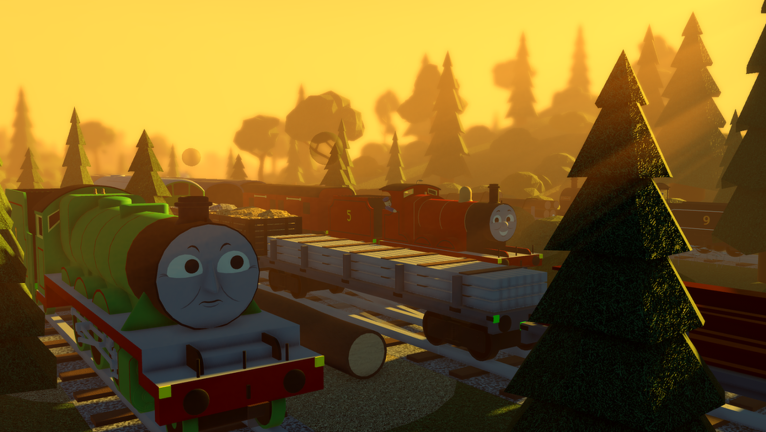
Blue Train With Friends is a free-drive Thomas & Friends style Roblox sim set on the Island of Sodor. You explore stations, branch lines, and yards with friends, unlock engines through missions, and customize faces, toggles, and liveries. This guide covers your first session from joining Place 77958375146330 through driving confidently and knowing what to do next.
Join the experience
Open Roblox and launch Blue Train With Friends. Servers hold a modest player count, so you will usually land near other drivers without a crowded lobby. After loading, you spawn as your avatar on the map — typically near a major station such as Knapford. Take a moment to orient yourself: look for platforms, sheds, signal posts, and the UI panels that list engines and missions.
There is no paid gate to basic driving. The fun is exploration, collecting engines, completing mission objectives, and chatting while you run trains together. Bookmark this wiki so you can return for controls, engine locations, and mission walkthroughs when you need details.
Spawn your first engine
Engines sit around the island as driveable models. Walk up to one you can sit in, use the VehicleSeat (or the on-screen sit prompt on mobile), and you become the driver. Early on, stick to well-known mainline engines near Knapford and Tidmouth so you learn routes before hunting rare or mission-locked locos.
If a seat is taken, wait or find another engine nearby. Many sheds and yards hold several options. Once seated, check that the camera follows the loco and that throttle or movement inputs respond. If nothing moves, leave the seat and try again, or switch engines — occasional seat glitches happen on busy servers.
For a fuller map of where models spawn across the Mainline, Thomas’s branch, the Little Western, and narrow gauge areas, use the Find Engines guide. That page pairs well with this one once you can drive without crashing into every buffer stop.
Learn the UI before racing off
Blue Train With Friends uses on-screen menus for faces, toggles, liveries, and missions. Scroll the UI to reveal face options and feature toggles for the engine you are driving. Liveries are handled through the livery system — pick a paint scheme when the engine supports multiple looks. On Donald and Douglas, tender numbers can be set by interacting with the tender buffers or running board; details live in the Donald & Douglas unlock guide and the controls guide.
Open the mission menu early even if you are not ready to claim rewards. Seeing listed missions (paint buckets near Knapford for BR Rebecca, Henry’s Tunnel and Toad’s Pond for Furness Edward, blueprints for A1 Henry, talking to McBunn at the Knapford shop for Donald & Douglas) helps you plan routes. Claiming is done from that same menu after you collect the required pieces — do not expect an automatic unlock the second you touch an item.
Creative players should also note that F3X building tools are available for placement work. Treat F3X as a creative layer: learn basic move and rotate before littering the mainline with props. Full creative steps live in the F3X Building guide; the embedded video on this page focuses on the Thomas branch line update so new drivers recognize Dryaw-to-Elsbridge scenery early.
Drive your first lap
Controls follow Roblox VehicleSeat conventions. On PC, use the usual movement keys while seated; on mobile, use the on-screen drive controls. Brake early before platforms and points. Sodor layouts reward smooth approaches more than top speed. Watch for other players reversing out of sheds and for junctions where the wrong road sends you toward a dead end or the Lead Mines approaches.
A sensible first route is a short mainline hop between Knapford and a neighboring station, then a return. Practice stopping at platforms, leaving the seat, and reseating. Once that feels natural, explore a branch — Thomas’s branch is a classic next step — then return to the mainline before you get lost deep in the countryside.
If you fall off the map or clip through scenery, you may stumble into hidden spaces tied to the An unseen world badge (Trackrooms / fake wall near Tidmouth Station). That is optional day-one content; see the badges guide when you want easter eggs rather than normal driving.
Start a first mission
After one clean drive, open missions and pick something nearby. A popular beginner chain starts with paint buckets around Knapford for BR Rebecca: find the buckets near the goods shed and station area, including shed-side locations, then claim Repainted Rebecca (or the equivalent mission name) in the mission menu. Next, try Furness Edward pieces at Henry’s Tunnel and Toad’s Pond, or the A1 Henry blueprint behind Season 7 Knapford Sheds. Full step lists belong in Unlock Missions.
Do not skip the claim step. Collecting every prop without opening the mission menu leaves the reward unclaimed. If a mission mentions talking to an NPC — especially McBunn at the Knapford shop for Donald & Douglas — walk up and interact before hunting further objectives.
Where to go next
Use this checklist after your first hour:
- Confirm you can spawn, drive, stop, and leave a seat cleanly — then skim Controls for faces, toggles, liveries, and tender numbers.
- Browse Find Engines and mark which regions you have not visited (Mainline, Thomas branch, Little Western, narrow gauge).
- Finish at least one mission claim via Unlock Missions, then decide whether Donald & Douglas or Lead Mines content is your next goal.
- Check Codes if the community is sharing active redeemables, and skim the Tier List once you care which engines feel best to drive.
- Peek at Players for co-op etiquette tips and Updates for Halloween 2026 mainline extensions (Suddery Junction), new engines such as Bear, Stepney, and Timothy, and Lead Mines notes.
Halloween and seasonal decorations change the vibe of familiar stations without rewriting the core drive loop. Treat new track and engines as exploration goals, not blockers for day-one play. When you want deeper tours after this page, open Map and Locations for Harbour, Lead Mines, Suddery, and branch landmarks, and Halloween Engines for Bear, Stepney, Timothy, and October Saturday drips.
Common first-day mistakes
Ignoring the mission menu after collecting items. Touched paint buckets and blueprints only count when you claim in the UI.
Driving too fast into junctions. Learn stopping distances before you chase rare engines across the island.
Assuming every engine is free. Some locos are mission rewards or tied to specific unlocks; hunting every shed is still fun, but missions expand the roster faster.
Skipping UI scroll. Faces and toggles hide below the fold of the panel — scroll before deciding the engine has no options.
Wandering into Lead Mines without a plan. The area adds missions and the unlockable Pump Trolley, but players report invisible track bugs left of the mines. Read Lead Mines before committing a long session there.
Play with friends
Blue Train With Friends shines when a small group runs trains together. Agree on a meet point (Knapford is easy), assign who drives which engine, and leave space at platforms. Server size is limited, so a coordinated group usually stays together. Share mission progress in chat so nobody claims the wrong reward or blocks a seat needed for a photo.
Respect other drivers: do not repeatedly derail people for laughs, and leave creative F3X builds where they do not block running lines unless the server is clearly in sandbox mode.
Keep this wiki handy
Day one is about comfort on the rails and knowing the mission loop. Everything else — badge hunting, Donald & Douglas, Lead Mines Pump Trolley, livery perfectionism — builds on those basics. Return to this page if you ever feel lost after an update, then branch into the linked guides for depth. When a patch drops, start with Updates, then revisit missions and engine maps if spawn locations shifted.
You now have a clear path: join, spawn, learn UI, drive a short lap, claim a nearby mission, and follow the linked guides for engines, controls, badges, and special unlocks. Enjoy Sodor — and watch those buffers.
Frequently Asked Questions
Quick answers for Blue Train With Friends players.
Is Blue Train With Friends free to play?
Yes. It is a free Roblox vehicle sim. You can drive many engines and explore Sodor without paying; some engines unlock through missions and exploration.
Where should I spawn my first engine?
Start near Knapford or other busy mainline sheds so you learn VehicleSeat driving on familiar track before hunting branch-line or mission-locked engines.
How do missions unlock engines?
Collect the required items or talk to the listed NPC, then open the mission menu and claim the reward. Examples include paint buckets for BR Rebecca and McBunn at Knapford for Donald & Douglas.
What should I do after the first hour?
Read the controls and find-engines guides, finish another mission, then choose a longer goal such as Donald & Douglas, badges, or the Lead Mines Pump Trolley.